> ## Documentation Index
> Fetch the complete documentation index at: https://moengage-partner-guide.mintlify.site/llms.txt
> Use this file to discover all available pages before exploring further.
# Telegram
## Introduction
[Telegram](https://telegram.org/) is an instant messaging app that is simple, fast, secure, and synced across all devices. Through Telegram, brands can easily engage with their customers with rich messaging.
## MoEngage × Telegram
MoEngage and Telegram integration allows you to leverage advanced segmentation, predictive capabilities, personalization, and triggering features to message your users in Telegram using the Telegram Bot through the [Telegram APIs](https://core.telegram.org/api).
## Integration
* **Telegram bot**: To use this integration, you must have a Telegram bot. When sending Telegram messages, your messages are associated with your Telegram bot official, resulting in users seeing your bot details.
* **Channel Access Token**: This allows you to send messages to users who have added your Telegram.
* **Telegram Chat IDs**: You must have a Telegram Chat ID to send messages to users on Telegram. The IDs are different from the user's Username. After a user adds your Telegram official account, you can access the user's Telegram ID through [Telegram's Users API](https://core.telegram.org/bots/api).
* **Connected Channels add-on**: Telegram is part of the Connected Channels add-on. Contact your dedicated MoEngage CSM (customer success manager) to enable it for your account.
You can send personalized campaigns only to users with a user identifier (Telegram Chat ID).
Telegram allows you to send promotional and non-promotional messages to users, provided your brand has secured their consent. To send to your users, one of the following conditions must be fulfilled:
* Users who have added your Telegram bot
* Users who haven't added their Telegram bot but have sent a message to your Telegram bot (excluding users who have blocked your Telegram bot)
### Step 1: Collect your users' Telegram Chat IDs
To send messages in Telegram, you must collect your users' Telegram Chat IDs to consistently identify and interact with them. Telegram Chat IDs are not the same as the user's Telegram usernames. Telegram Chat IDs are generated by Telegram and can be used when interacting with [Telegram's APIs](https://core.telegram.org/bots/api#available-methods).
For more information on getting Telegram Chat IDs for Users, Channels, and Groups, see [this guide](https://gist.github.com/nafiesl/4ad622f344cd1dc3bb1ecbe468ff9f8a).
### Step 2: Save the user's Telegram Chat ID on MoEngage
After obtaining a list of Telegram Chat IDs, you must add them to MoEngage as a `telegram_chat_id` custom user attribute. You can:
* Pass this data to MoEngage using the [Track User API](/api/user/track-user).
* Upload it using [User Imports](/user-guide/data/imports/file-based-imports/import-user-data-using-csv) in MoEngage.
### Step 3: Integrate Telegram with MoEngage
To integrate Telegram with MoEngage:
1. On the left navigation menu in the MoEngage dashboard, click **App marketplace**. The App Marketplace page is displayed.
2. Search for **Telegram**.
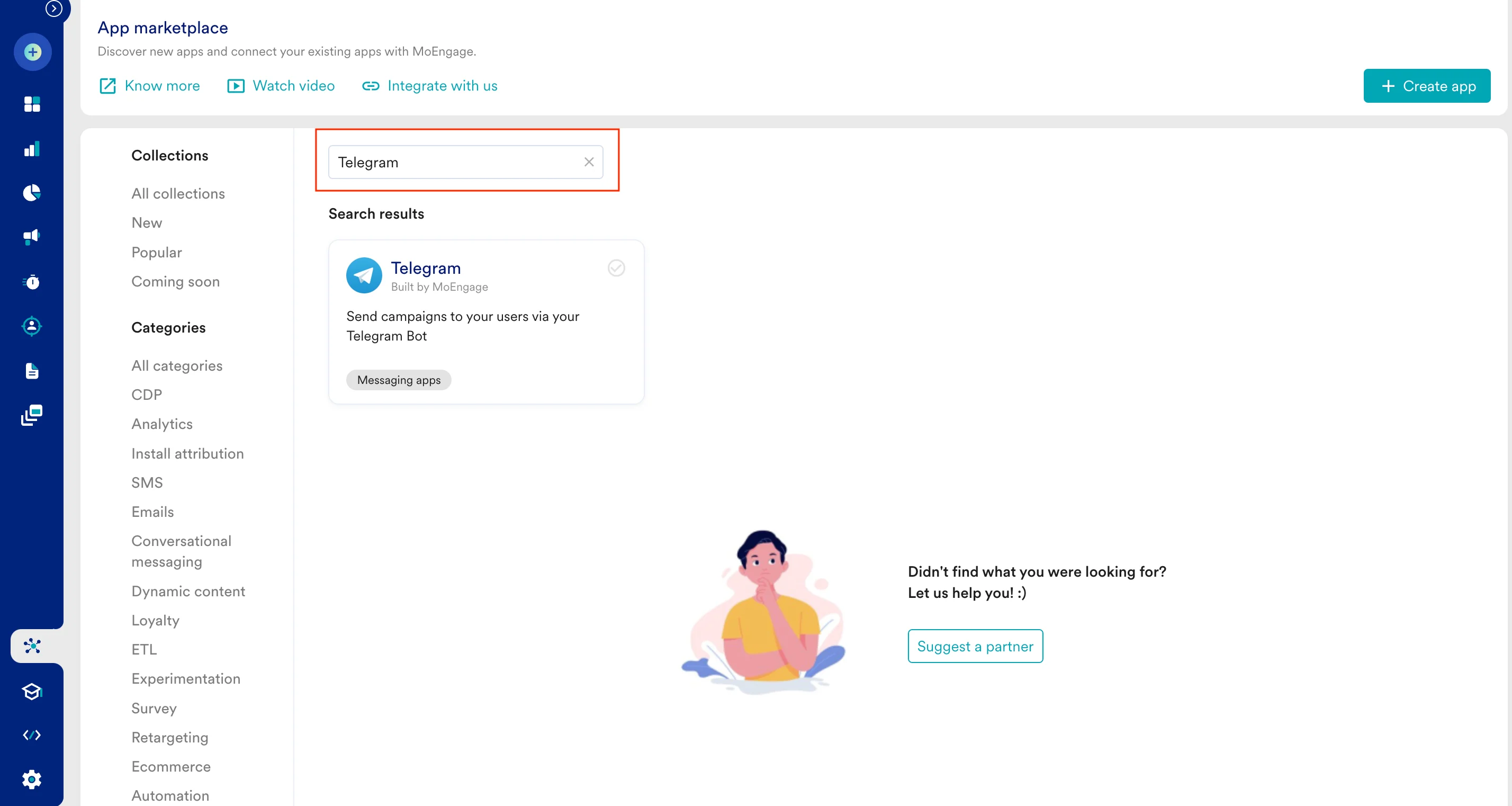 3. Click the **Telegram** tile. The Telegram page is displayed.
4. Go to the **Integrate** tab, and click **+ Add connection**.
5. Enter the following details:
| Field | Description | Example |
| ------------------------------------------------------------------------------------------------------------------------------------------------------------------------------------------------------------------------------------------------------------------------------------------------------------------------------------------------------------------------------------------------------------------------------------------------------------------------------------------------------------------------------------------------------------------------------------------------------------------------------------------------------------------------------------------------------------------------------------------------------------------------------------------------------------------------------------------------------------------------------------------------------------------------------------------------------------------------------------------------------------------------------------------------------------------------------------------------------------------------------------------------------------------------------------------------------------------------------------------------------------------------------------------------------------------------------------------------------------------------------------------------------------------------------------------------------------------------------------------------------------------------------------------------- | ---------------------------------------------------------------------------------------------------------------------------------------------------------------------------------------------------------------------------------- | ------------------------------------------- |
| **Connection name** | Name of the Telegram connection. | My Telegram Bot |
| **Telegram Bot Token** | Your Telegram Bot token. When a bot is created, it is provided with a unique authentication token. For more information on obtaining and generating tokens, see [Telegram Bot](https://core.telegram.org/bots/features#botfather). | `123456:ABC-DEF1234ghIkl-zyx57W2v1u123ew11` |
|
3. Click the **Telegram** tile. The Telegram page is displayed.
4. Go to the **Integrate** tab, and click **+ Add connection**.
5. Enter the following details:
| Field | Description | Example |
| ------------------------------------------------------------------------------------------------------------------------------------------------------------------------------------------------------------------------------------------------------------------------------------------------------------------------------------------------------------------------------------------------------------------------------------------------------------------------------------------------------------------------------------------------------------------------------------------------------------------------------------------------------------------------------------------------------------------------------------------------------------------------------------------------------------------------------------------------------------------------------------------------------------------------------------------------------------------------------------------------------------------------------------------------------------------------------------------------------------------------------------------------------------------------------------------------------------------------------------------------------------------------------------------------------------------------------------------------------------------------------------------------------------------------------------------------------------------------------------------------------------------------------------------------- | ---------------------------------------------------------------------------------------------------------------------------------------------------------------------------------------------------------------------------------- | ------------------------------------------- |
| **Connection name** | Name of the Telegram connection. | My Telegram Bot |
| **Telegram Bot Token** | Your Telegram Bot token. When a bot is created, it is provided with a unique authentication token. For more information on obtaining and generating tokens, see [Telegram Bot](https://core.telegram.org/bots/features#botfather). | `123456:ABC-DEF1234ghIkl-zyx57W2v1u123ew11` |
| 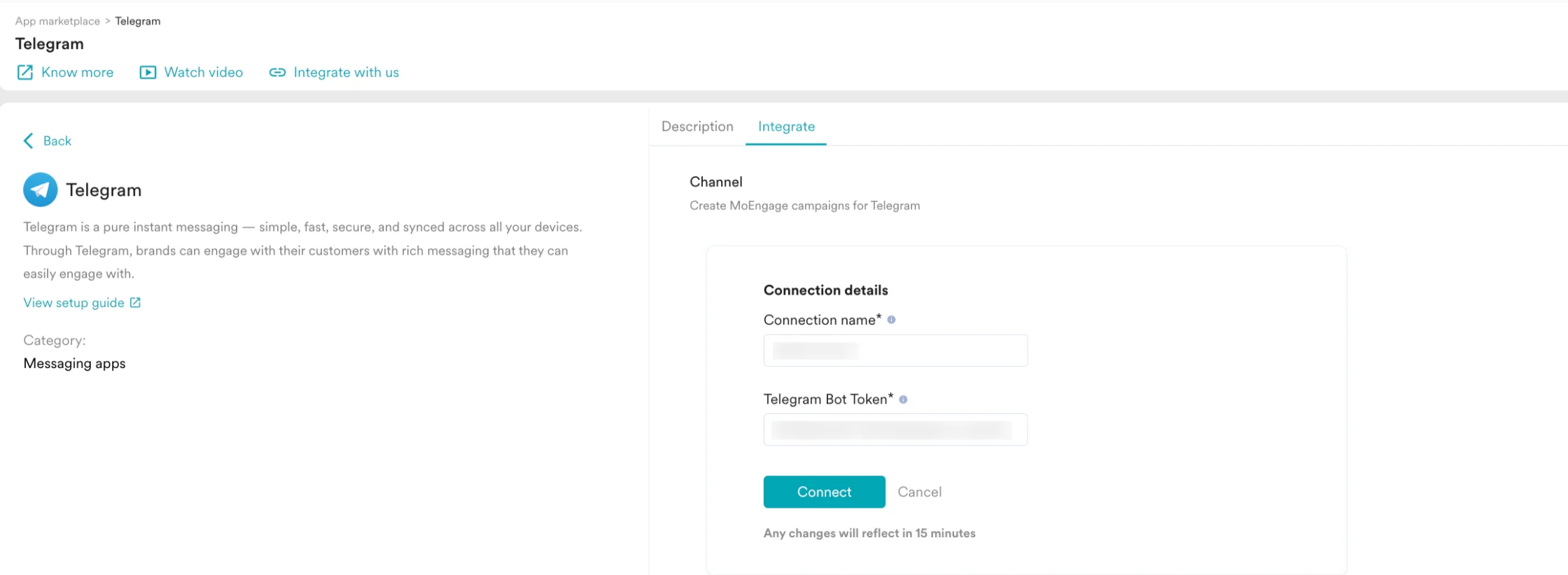 | | |
6. Click **Connect**. Your Telegram connection is now integrated.
| | |
6. Click **Connect**. Your Telegram connection is now integrated.
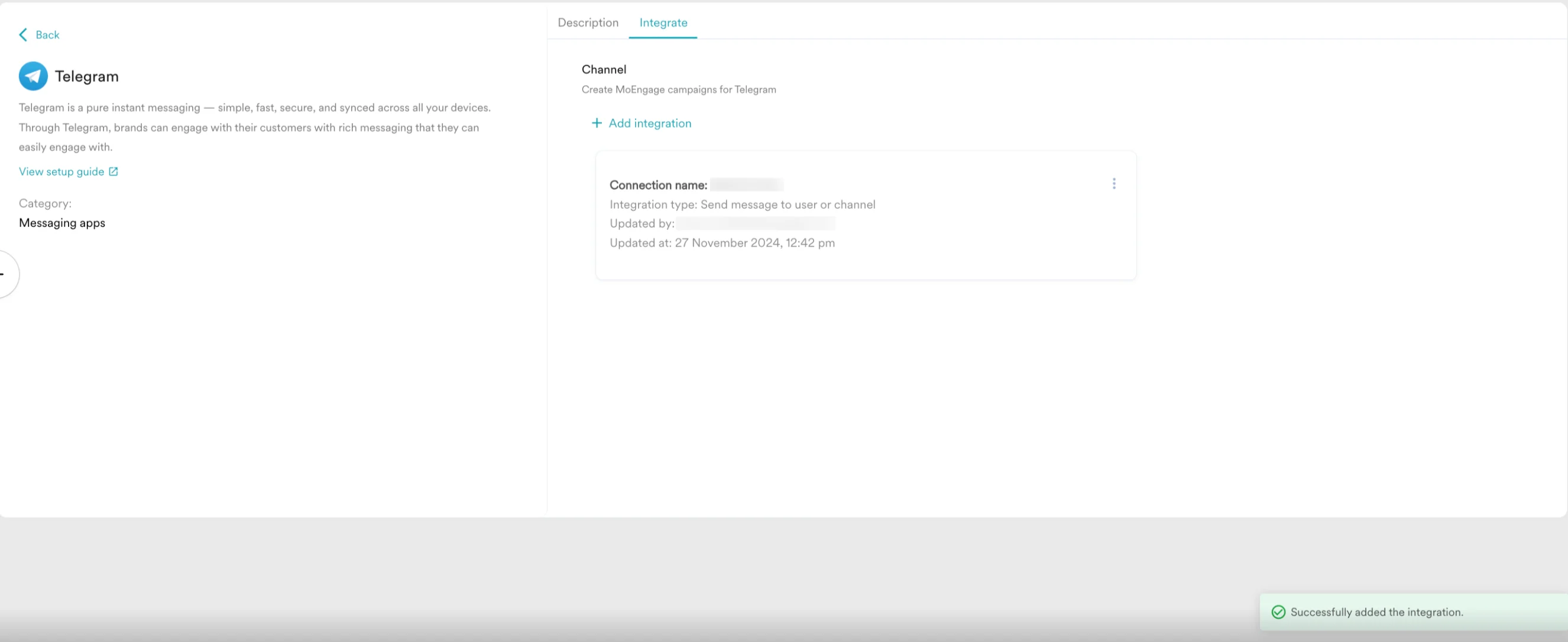 You can now use Telegram to start creating campaigns.
### Step 4: Create a campaign on MoEngage to send a Telegram message
To create a campaign on MoEngage:
1. On the left navigation menu in the MoEngage dashboard, click **Engage**, and then click **Campaigns**.
2. On the **All campaigns** page, click **+ Create campaign**.
3. On the **Create campaign** dialog box, under **Connected Apps**, click **Telegram** and then click the most suitable delivery type.
You can now use Telegram to start creating campaigns.
### Step 4: Create a campaign on MoEngage to send a Telegram message
To create a campaign on MoEngage:
1. On the left navigation menu in the MoEngage dashboard, click **Engage**, and then click **Campaigns**.
2. On the **All campaigns** page, click **+ Create campaign**.
3. On the **Create campaign** dialog box, under **Connected Apps**, click **Telegram** and then click the most suitable delivery type.
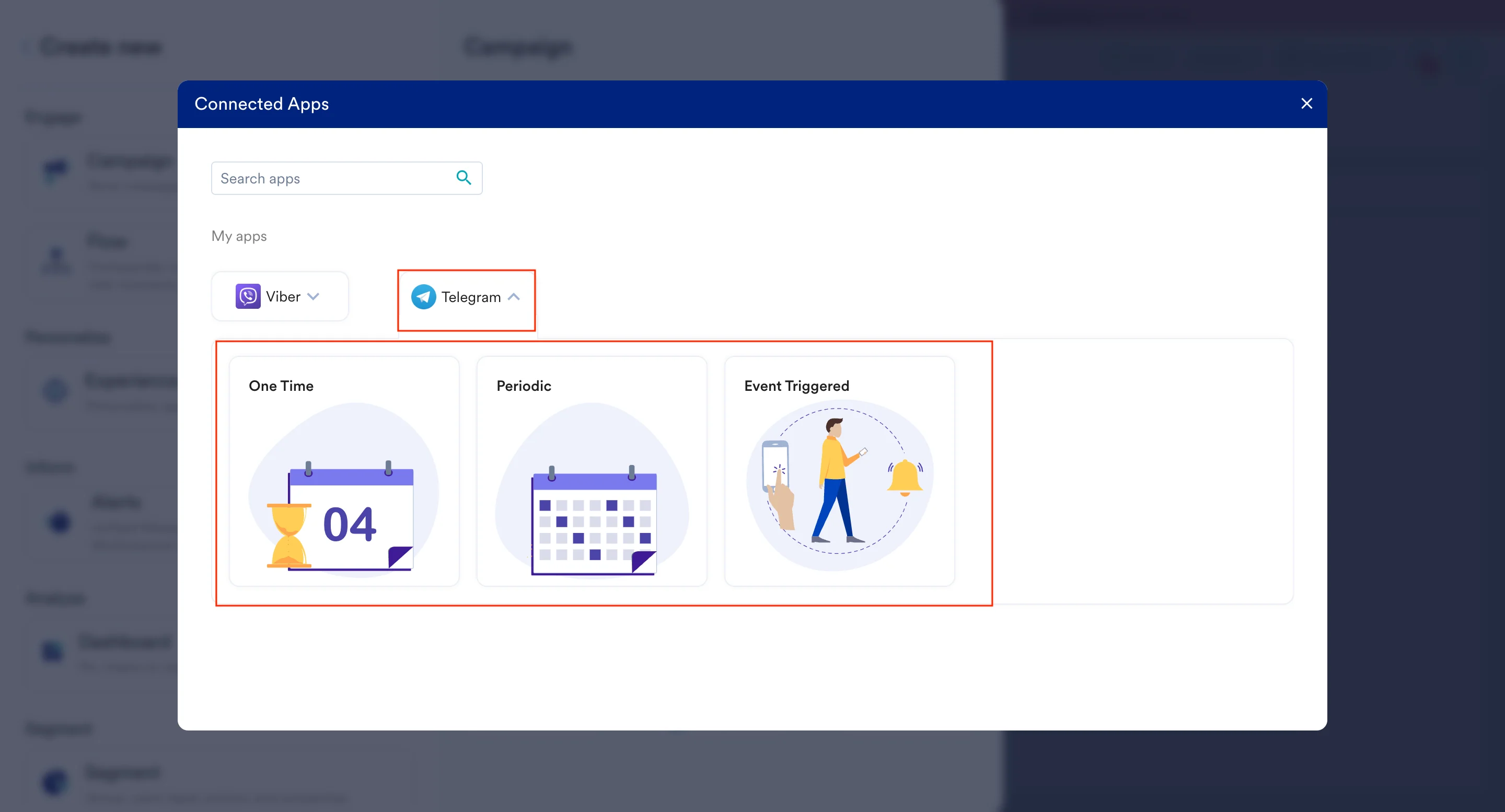 4. Under **Select audience**, click **Filter users by**.
5. On the **User property** tab, select the segment of users for whom `telegram_chat_id` exists (you can combine it with other segment criteria).
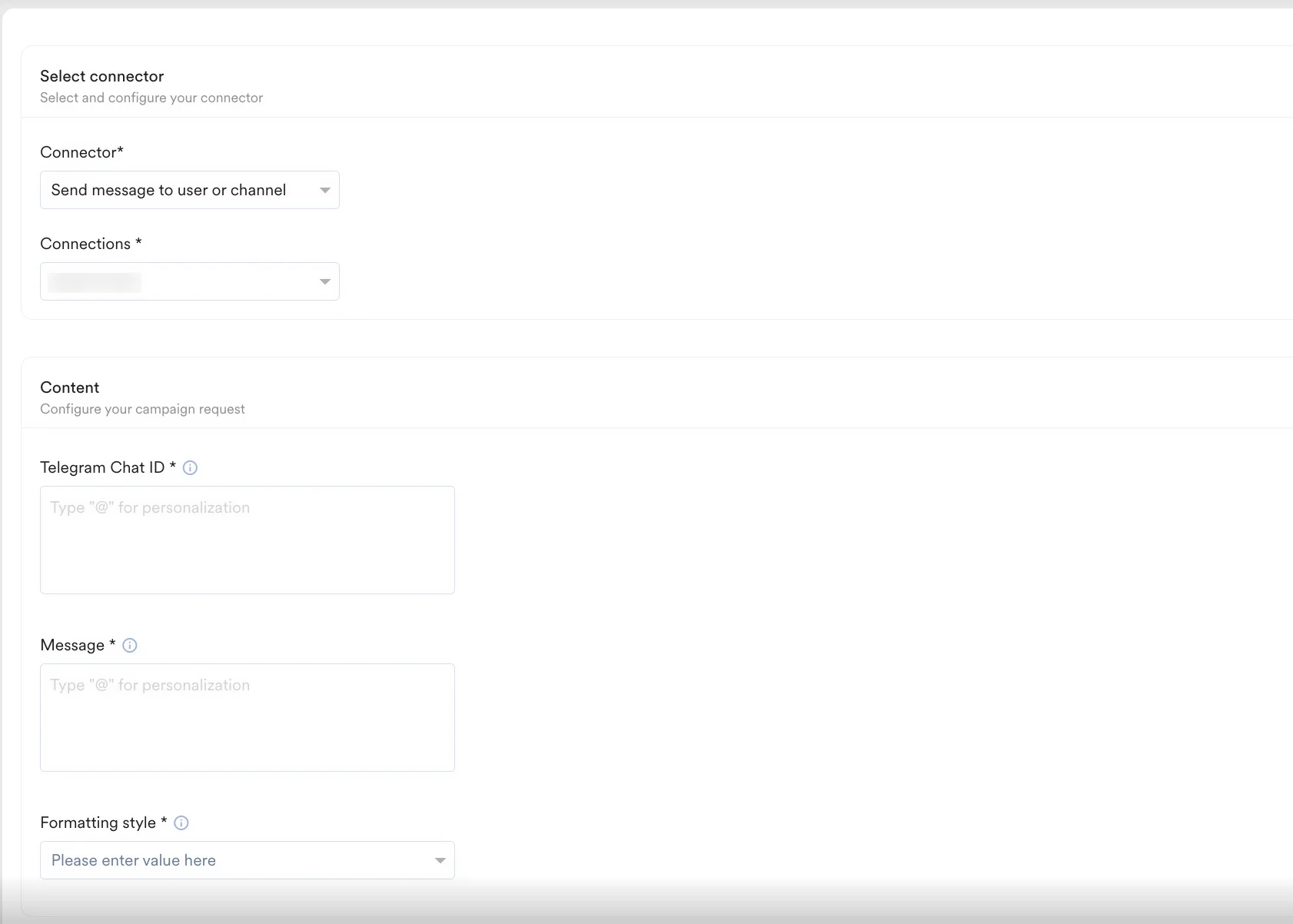
6. In step 2 of the campaign, select the pre-configured connectors and specify the content you want to send out. Enter the following details:
| Field | Description |
| ------------------------------------------------------------------------------------------------------------------------------------------------------------------------------------------------------------------------------------------------------------------------------------------------------------------------------------------------------------------------------------------------------------------------------------------------------------------------------------------------------------------------------------------------------------------------------------------------------------------------------------------------------------------------------------------------------------------------------------------------------------------------------------------------------------------------------------------------------------------------------------------------------------------------------------------------------------------------------------------------------------------------------------------------------------------------------------------------------------------------------------------------------------------------------------------------------------------------------------------------------------------------------------------------------------------------------------------------------------------------------------------------------------------------------------------------------------------------------------------------------------------------------------------------------------------ | ----------------------------------------------------------------------------------------------------------------------------------------------------------------------------------------------------------------------------------------------------------------------------------------------------------------------------------------------------------------------------------------------------------------------- |
| **Connector** | Select a pre-configured connector you want to use:
4. Under **Select audience**, click **Filter users by**.
5. On the **User property** tab, select the segment of users for whom `telegram_chat_id` exists (you can combine it with other segment criteria).
6. In step 2 of the campaign, select the pre-configured connectors and specify the content you want to send out. Enter the following details:
| Field | Description |
| ------------------------------------------------------------------------------------------------------------------------------------------------------------------------------------------------------------------------------------------------------------------------------------------------------------------------------------------------------------------------------------------------------------------------------------------------------------------------------------------------------------------------------------------------------------------------------------------------------------------------------------------------------------------------------------------------------------------------------------------------------------------------------------------------------------------------------------------------------------------------------------------------------------------------------------------------------------------------------------------------------------------------------------------------------------------------------------------------------------------------------------------------------------------------------------------------------------------------------------------------------------------------------------------------------------------------------------------------------------------------------------------------------------------------------------------------------------------------------------------------------------------------------------------------------------------ | ----------------------------------------------------------------------------------------------------------------------------------------------------------------------------------------------------------------------------------------------------------------------------------------------------------------------------------------------------------------------------------------------------------------------- |
| **Connector** | Select a pre-configured connector you want to use: - **Send a message to a user or a channel** — Use this connector to send text messages to users or channels. MoEngage supports sending text messages without CTAs.
|
| **Connections** | Select the connection you added to the MoEngage App marketplace. |
| **Telegram Chat ID** | Enter the Telegram Chat ID. It is a unique identifier assigned to each user on the Telegram messaging platform. You can also use personalization here. If you want to send a message to a channel or a group, see [Send a Telegram message to the channel or group](#send-a-telegram-message-to-the-channel-or-group). |
| **Message** | Enter the message content you want to send. You can also use personalization here. For more information on Telegram formatting options, see [Formatting options](https://core.telegram.org/bots/api#formatting-options). |
| **Formatting Style** | Choose your formatting style based on your message content. Choose the preferred format for how Telegram renders messages to your users: - [MarkdownV2 style](https://core.telegram.org/bots/api#markdownv2-style)
- [HTML style](https://core.telegram.org/bots/api#html-style) (limited support via Content Blocks)
- [Markdown style](https://core.telegram.org/bots/api#markdown-style)
|
|  | |
7. Your campaign is now ready to be tested and sent. Using the **Test** functionality, you can also test your connector configuration.
| |
7. Your campaign is now ready to be tested and sent. Using the **Test** functionality, you can also test your connector configuration.
 If your test user successfully receives the message, your setup is ready.
8. Publish the campaign.
## Send a Telegram message to the channel or group
Perform the following steps to send campaigns to your Telegram channel or group:
1. Create a new user in MoEngage to message a channel or a group. Ensure the Telegram Chat ID here is your channel ID or group ID.
2. Select the user by creating a segment for it. Ensure only one user is included in the segment. When multiple users are selected for the campaign, the message gets sent to the channel or group many times.
3. In step 2 of **Create campaign**, enter the Telegram Chat ID of your channel or group. You can also use personalization here.
## Campaign analytics
MoEngage campaigns provide powerful analytics that allow you to analyze your campaign performances. Each channel in MoEngage provides in-depth metrics that help you quantify your campaign goals. For more information on the MoEngage Analytics functionalities, see [Campaign Analytics](/user-guide/campaigns-and-channels/connected-apps/analyze/connected-apps-campaign-analytics).
By default, MoEngage provides the following metrics for Telegram campaigns:
1. **Attempted**: After removing the users who breached the frequency capping (FC), *Attempted* is calculated as the number of users who qualified for the Telegram campaigns and to whom MoEngage attempted to send messages.
2. **Failed**: Number of users for whom Telegram did not send any message or the users for whom MoEngage failed to find any value against the user or event attributes used in the campaign.
3. **Successfully sent**: The campaign is marked as successful when Telegram APIs accept the request to send the message to users, groups, or rooms (with a 200 status code). For more information on Telegram Message API responses, see the [Telegram Bot API documentation](https://core.telegram.org/bots/api).
If your test user successfully receives the message, your setup is ready.
8. Publish the campaign.
## Send a Telegram message to the channel or group
Perform the following steps to send campaigns to your Telegram channel or group:
1. Create a new user in MoEngage to message a channel or a group. Ensure the Telegram Chat ID here is your channel ID or group ID.
2. Select the user by creating a segment for it. Ensure only one user is included in the segment. When multiple users are selected for the campaign, the message gets sent to the channel or group many times.
3. In step 2 of **Create campaign**, enter the Telegram Chat ID of your channel or group. You can also use personalization here.
## Campaign analytics
MoEngage campaigns provide powerful analytics that allow you to analyze your campaign performances. Each channel in MoEngage provides in-depth metrics that help you quantify your campaign goals. For more information on the MoEngage Analytics functionalities, see [Campaign Analytics](/user-guide/campaigns-and-channels/connected-apps/analyze/connected-apps-campaign-analytics).
By default, MoEngage provides the following metrics for Telegram campaigns:
1. **Attempted**: After removing the users who breached the frequency capping (FC), *Attempted* is calculated as the number of users who qualified for the Telegram campaigns and to whom MoEngage attempted to send messages.
2. **Failed**: Number of users for whom Telegram did not send any message or the users for whom MoEngage failed to find any value against the user or event attributes used in the campaign.
3. **Successfully sent**: The campaign is marked as successful when Telegram APIs accept the request to send the message to users, groups, or rooms (with a 200 status code). For more information on Telegram Message API responses, see the [Telegram Bot API documentation](https://core.telegram.org/bots/api).