

Endpoints
The Data API is a collection of the following API endpoints:- Track User: Adds or updates users and user properties in MoEngage.
- Get User: Facilitates the retrieval of information of users.
- Merge User: Merges two users in MoEngage based on their ID.
- Delete User: Deletes users in MoEngage.
- Track Event: Tracks the actions of a user.
- Track Device: Adds or updates devices and device properties in MoEngage.
- Device Opt-out: Blocks or unblocks specific devices from receiving push notifications.
- Trigger File Imports: Triggers scheduled file imports.
- Import Details: Fetches the status at an import level.
- Import File Run History: Fetches the file processing status of each file contained in an import.
- Bulk Import: Sends multiple user and event requests in batch to MoEngage.
- Install Tracking: Tracks the install attribution data in MoEngage.
- Test connection: Validates if the entered endpoint details are valid.
- Track User
- Create Event
- Bulk Import
- Create users through Server-to-Server Data APIs even when they do not have an ID (but have other identifiers).
- Create a user or track events of a user when identifiers other than ID (for example, email ID or phone number) are known.
Request Body
The request body contains the mandatory field calledcustomer_id. It is the unique identifier set and passed on from the MoEngage SDK as USER_ATTRIBUTE_UNIQUE_ID and is visible on the dashboard as ID.
customer_id is used to:
- Identify or create a user in MoEngage.
- Associate the events with the corresponding unique user profiles in MoEngage.
customer_id is used to verify if the user exists in MoEngage. If the user does not exist, a new user is created with the attributes or events.
- The maximum limit for the request body is 128 KB.
- Any string of more than one characters is allowed for
customer_idexcept the following values - [‘unknown’, ‘guest’, ‘null’, ‘0’, ‘1’, ‘true’, ‘false’, ‘user_attribute_unique_id’, ‘(empty)’, ‘na’, ‘n/a’, ”, ‘dummy_seller_code’, ‘user_id’, ‘id’, ‘customer_id’, ‘uid’, ‘userid’, ‘none’, ‘-2’, ‘-1’, ‘2’]
Sample Request Body
Below is a sample request body for the Create User API:Supported Datetime Formats
You can pass the datetime in the following formats in the request body:- Future and past date values are accepted and ingested.
- Any date values with incorrect calendar values (e.g., 2019-15-12 where 15 is not a valid month) are ingested as strings.
- Any datetime values incompatible with the formats mentioned above are converted to strings and then ingested.
Response
Response to the Data API is a JSON object. On a successful data API request, you will receive the following response:Response Codes
The following status codes and associated error messages are returned when the request results in an error.User Attributes
Dashboard User Profile
On sending data through the data API, it will be populated in the user profile as shown below: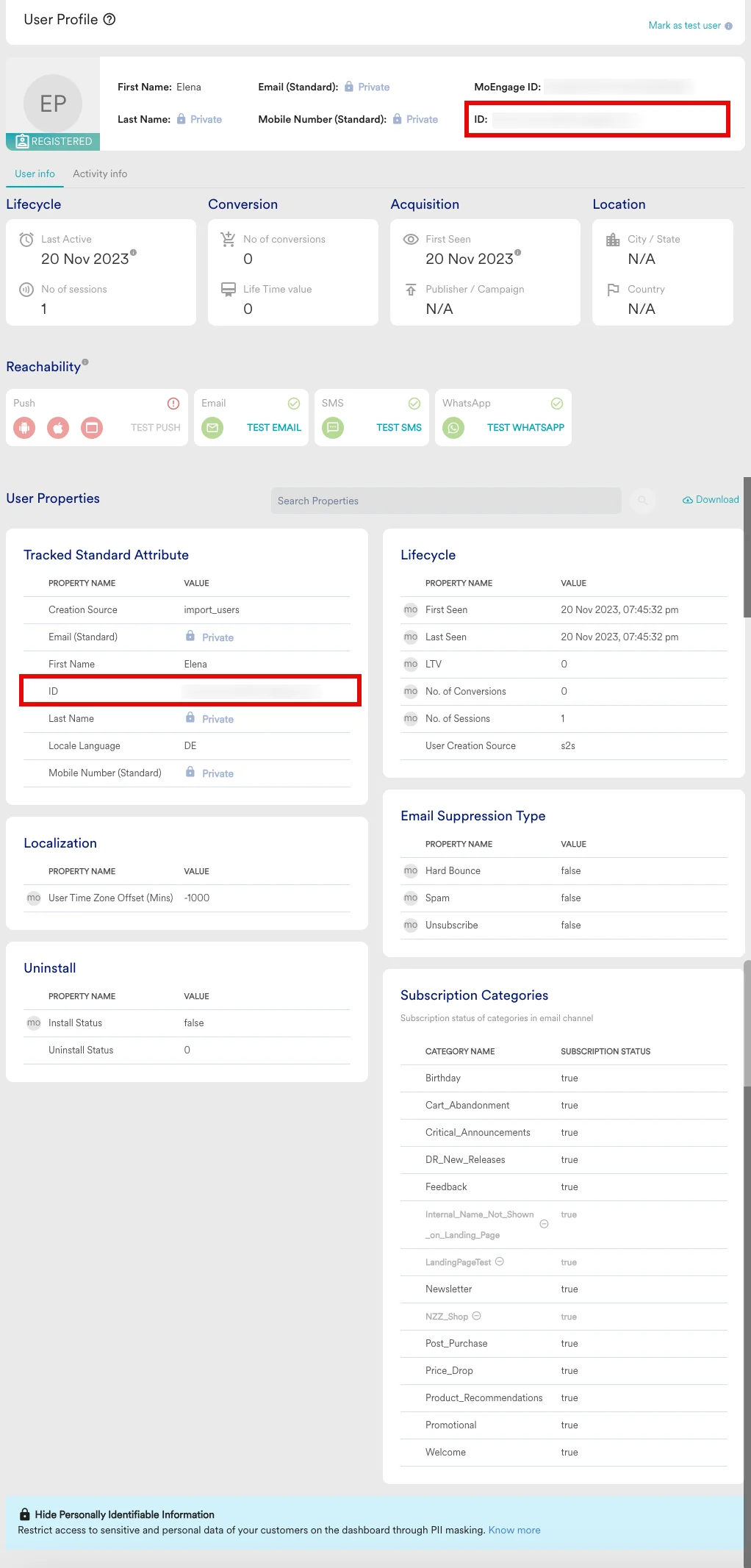
Limits
The Data API is designed to handle high volumes of data across our customer base. We enforce API limits to ensure responsible use of the API. Refer to the respective endpoint documentation for rate limits.- If your requirement exceeds the default limits, you can contact the MoEngage support team to increase the limits.
- Make sure to adhere to the Fair Usage Policy (FUP) for high-frequency user data ingestion. This is mandatory to prevent disruption to data processing in your workspace. For more information, refer to the Fair Usage Policy (FUP).
FAQs
Track User
How do we reduce the 5xx errors because of too many requests per second/minute?
How do we reduce the 5xx errors because of too many requests per second/minute?
How do I know if my user data has been ingested into MoEngage?
How do I know if my user data has been ingested into MoEngage?
Although, this happens very rarely and you can search for newly ingested users in:
Segment > Create Segment > Search for users using their IDs
Can I use this API to also export users?
Can I use this API to also export users?
Can I use this API to delete users from MoEngage?
Can I use this API to delete users from MoEngage?
Get User
How do I know which users are available to export and which users are not available in MoEngage to export?
How do I know which users are available to export and which users are not available in MoEngage to export?
users key, and users not available will be found in the users_not_found key. Please refer to the sample response in this doc.What if I want to get all the user data available based on the user IDs without specifying the fields?
What if I want to get all the user data available based on the user IDs without specifying the fields?
user_fields_to_export is not passed, then all custom attributes and exportable standard attributes will be returned. For specific fields, user_fields_to_export needs to be passed along with the list of required fields.Merge User
Will the merged user information be available after using this API?
Will the merged user information be available after using this API?
What will happen to the reachability of the retained user?
What will happen to the reachability of the retained user?
Can any two users be merged?
Can any two users be merged?
Should both users have a device attached to them before merging?
Should both users have a device attached to them before merging?
Is there any restriction on the number of times a user can be merged?
Is there any restriction on the number of times a user can be merged?
Is there any restriction on the number of devices a merged/retained user should have?
Is there any restriction on the number of devices a merged/retained user should have?
What happens to the merged_user after the merge?
What happens to the merged_user after the merge?
retained_user. All events and user details of the merged_user will reflect on the retained_user. A merge event MOE_USER_MERGE_EVENT will be added to the merged_user (who will only have the MoEngage ID now).What happens to the retained_user after the merge?
What happens to the retained_user after the merge?
retained_user will now have all the user, device, and event details of the merged_user along with its own existing details. A MOE_USER_MERGED event will be added to the retained_user.What happens if a user creation request comes with the same ID as the deleted user?
What happens if a user creation request comes with the same ID as the deleted user?
What happens to the reachability if both users do not have devices?
What happens to the reachability if both users do not have devices?
What is the SLA to see user details reflect after the merge?
What is the SLA to see user details reflect after the merge?
How are events copied from the merged user to the retained user?
How are events copied from the merged user to the retained user?
Delete User
Can you reverse a delete operation?
Can you reverse a delete operation?
Are the events of the users also deleted as well?
Are the events of the users also deleted as well?
How do you check if a user has been deleted from MoEngage?
How do you check if a user has been deleted from MoEngage?
Create Event
How to identify the events to a given user? What identifiers can I use?
How to identify the events to a given user? What identifiers can I use?
Can I send events for anonymous users?
Can I send events for anonymous users?
Can events be updated/modified?
Can events be updated/modified?
Track Device
Can I pass custom device attributes using the Device API?
Can I pass custom device attributes using the Device API?
What happens if I pass the Identifier for Vendors (IDFV) value in the API?
What happens if I pass the Identifier for Vendors (IDFV) value in the API?
How many devices can I create for a user?
How many devices can I create for a user?
What if I create a new device with a moe_gaid, idfv, or push_id value that already exists for an existing device attached to a user in my MoEngage workspace?
What if I create a new device with a moe_gaid, idfv, or push_id value that already exists for an existing device attached to a user in my MoEngage workspace?
MoEngage Streams
What is the throughput, average volume, and batch size that can be expected?
What is the throughput, average volume, and batch size that can be expected?
What is the retry mechanism of Streams?
What is the retry mechanism of Streams?
- First Retry: 30 seconds
- Second Retry: 60 seconds
- Third Retry: 120 seconds
If I pause Streams, can I still get the data later?
If I pause Streams, can I still get the data later?
Does Streams guarantee the latest user attributes?
Does Streams guarantee the latest user attributes?
Can I export historical data using Streams?
Can I export historical data using Streams?
Bulk Import
Do the internal MoEngage validations of Track User API and Create Event API apply in Bulk API as well?
Do the internal MoEngage validations of Track User API and Create Event API apply in Bulk API as well?
Customer payload type, and Create Event API validations apply to the Event payload type within the Bulk API request.How do we reduce 5xx errors caused by too many requests per second or minute?
How do we reduce 5xx errors caused by too many requests per second or minute?
How do I know if my user data has been ingested into MoEngage?
How do I know if my user data has been ingested into MoEngage?
Trigger File Imports
Does the trigger API change the import schedule?
Does the trigger API change the import schedule?