

Tracked Events
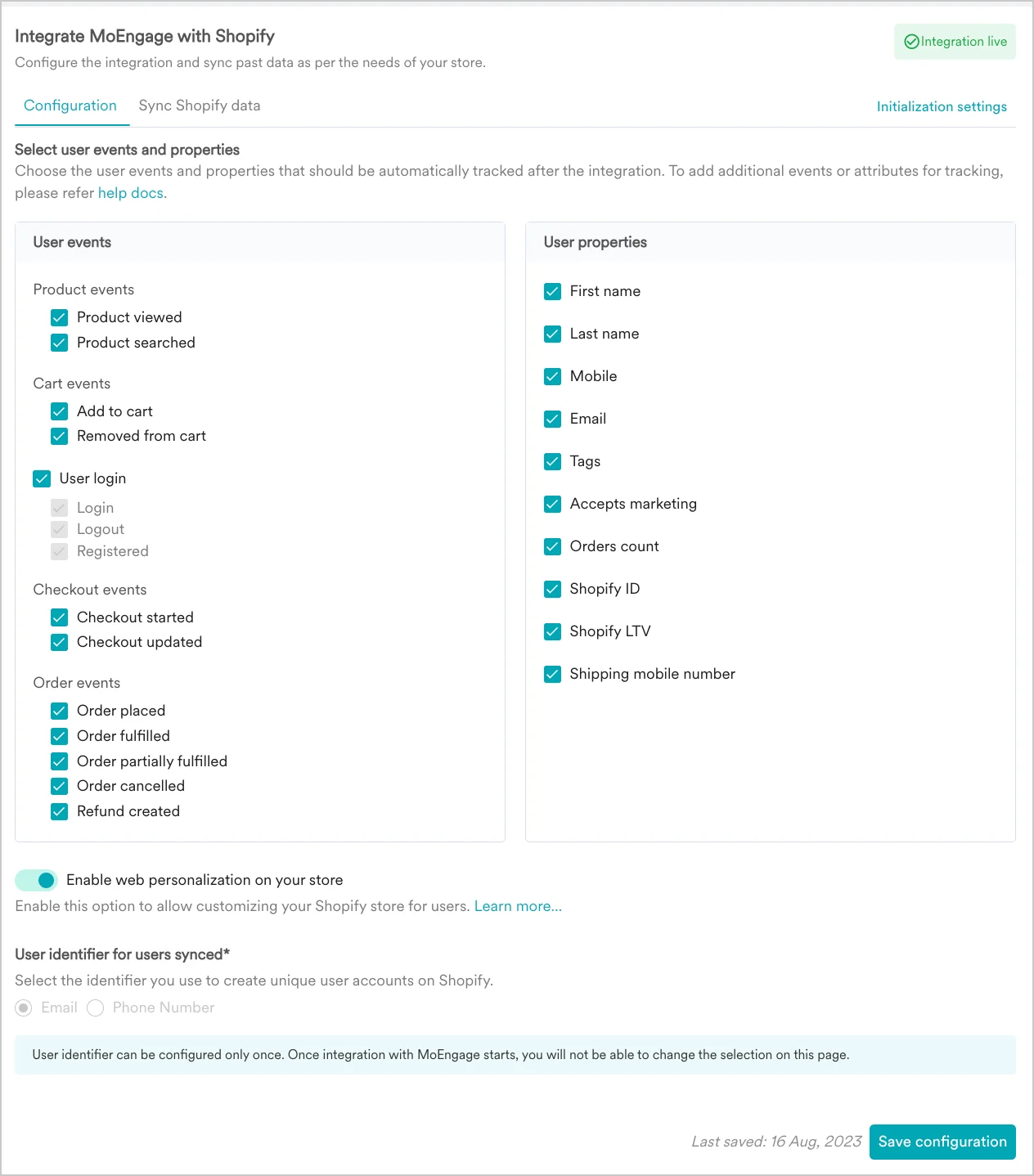
The following events can be tracked by MoEngage if enabled on your Shopify app during integration.| Event Type | Event Name | Description |
|---|---|---|
| Product Event | Product Viewed | This event is tracked when a user views a product. You can use this event to show personalized recommendations of similar products to the user or if the user happens to view a product that is out of stock, you can notify them when the item is back in stock, and so on. |
| Product Event | Product Searched | This is event is tracked when a product is searched. You can use this event to show personalized recommendations based on the user’s search preferences. For example, if a user were to search for a cosmetic product such as toner, you could show them recommendations for toners or allied skin care products. |
| Cart Event | Shopify - Add To Cart and Shopify -Update Cart | This event is tracked when a product is added to cart, or the cart is updated. This can be used to track cart abandonment, and you can engage with customers who’ve added items to their cart but not acted on it. |
| Cart Event | Removed from Cart | This event is tracked when a product is removed from cart. You can nudge users towards a purchase with recommendations for similar items or engage with them based on their past purchase history, and so on. |
| User Login Event | Customer Registered | This event is tracked when a customer registers with the Shopify store. This event can be used to show welcome messages to the user and used for onboarding communication. |
| User Login Event | Customer Logged In | This event is tracked when a customer logs in to the Shopify store. This event can be used to show relevant offers and nudge customers to act on items in their cart or nudge them towards subscribing to newsletters, and so on. |
| User Login Event | Customer Logged Out | Tracked when a customer logs out of the Shopify store. |
| Checkout Event | Shopify - Checkout Started | This event is tracked when the customer checks out items in their cart. |
| Checkout Event | Shopify - Checkout updated | This event is tracked when the customer updates their cart during checkout. |
| Order Event | Shopify - Order placed | This event is tracked when a customer completes the purchase. This event can be used to send order summary communication, show subscription-related messages, and nudge users to sign up for loyalty programs. |
| Order Event | Shopify - Order fulfilled | This event is tracked when an order is fulfilled and is ready to be shipped to the customer. |
| Order Event | Shopify - Order partially fulfilled | This event is tracked when an order is fulfilled but partially. This is raised when some items of the orders are fulfilled and some are not. |
| Order Event | Shopify - Order cancelled | This event is tracked when an order is canceled. |
| Order Event | Shopify - Refund created | This event is tracked when a refund has been created for the customer, either due to cancellation or complaints. These events can be used to send personalized communication to the users to ensure that they do not churn.\ |
You can not use “moe_” as a prefix while naming events, event attributes, or user attributes. It is a system prefix and using it might result in periodic blacklisting without prior communication.
Types of Events
Events are generally generated from two ends:- Webhook - These events are generated at the Shopify end and sent to MoEngage using the Webhook.
- Web SDK - These events are generated by MoEngage’s Web SDK based on user behavior on the website. For more information, refer to Web SDK events.
Sample Payloads for Webhook Events
{
    "Event Received Time": "17th July 2023, 03:25:55 pm",
    “Product Title”: “Sample Product”,
    "Updated At": "17th July 2023, 03:26:15 pm",
    "Variation ID": "123456",
    "Currency": "USD",
    "cart_token": "c1-fcdd3207bee3eef9f98abefaf2ca...",
    "Product ID": "845236547",
    "Price": 555.99,
    “Source”: “Shopify”,
    "Vendor Name": "845236547",
    "Created At": "17th July 2023, 03:25:55 pm",
    "Quantity": 2
}
{
     "Event Received Time": "17th July 2023, 03:25:55 pm",
     “Product Title”: “Sample Product”,
     "Updated At": "17th July 2023, 03:26:15 pm",
     "Variation ID": "123456",
     "Currency": "USD",
     "Product ID": "845236547",
     "Price": 555.99,
     “Source”: “Shopify”,
     "Vendor Name": "845236547",
     "Created At": "17th July 2023, 03:25:55 pm",
     "Quantity": 2
}
{
     "Event Received Time": "17th July 2023, 03:25:55 pm",
     “Product Title”: “Sample Product”,
     "Updated At": "17th July 2023, 03:26:15 pm",
     "ID": "3cce6aeedf786679ac03e043729fd...",
     "Variation ID": "0:123456",     "Currency": "USD",
     "Checkout ID": "3cce6aeedf786679ac03e043729fd...",
     “Source Name”: “web”,
     "cart_token": "c1-fcdd3207bee3eef9f98abefaf2ca...",
     "Checkout URL": "https://publicstorenewdb.myshopify.com/products/the-complete-snowboard",
     "Shopify Customer Id": 36838667059499,
     "Total Price": 327,
     "Price": 0:300.00,     "Subtotal Price": 300.00,
     “Source”: “Shopify”,
     "Vendor Name": "845236547",
     "Created At": "17th July 2023, 03:25:55 pm",
     "Quantity": 2,
     "Product ID": "845236547"
}
{
    "Event Received Time": "17th July 2023, 03:25:55 pm",
    “Product Title”: “0:Sample Product01”,
    "Updated At": "17th July 2023, 03:26:15 pm",
    "ID": "3cce6aeedf786679ac03e043729fd...",
    "Variation ID": "0:123456",
    "Currency": "USD",
    "Checkout ID": "3cce6aeedf786679ac03e043729fd...",
    "Source Name”: “web”,
    "cart_token": "c1-fcdd3207bee3eef9f98abefaf2ca...",
    "Checkout URL": "https://publicstorenewdb.myshopify.com/products/the-complete-snowboard",
    "Shopify Customer Id": 36838667059499,
    "Total Price": 327,
    "Price": [0:300.00],
    "Subtotal Price": 300.00,
    “Source”: “Shopify”,
    "Vendor Name": "845236547",
    "Created At": "17th July 2023, 03:25:55 pm",
    "Quantity": [0:1],
    "Product ID": [0:845236547]
  }
{
    "Event Received Time": "17th July 2023, 03:25:55 pm",
    "Shipping Address Country": "US",
    "Billing Address City": "New York",
    “Product Title”: “0:Sample Product01”,
    "cart_token": "c1-fcdd3207bee3eef9f98abefaf2ca...",
    "ID": "3cce6aeedf786679ac03e043729fd...",
    "Checkout ID": "3cce6aeedf786679ac03e043729fd...",
    "First Name": "John",
    "Currency": "USD",
    "Shipping Address Country Code": "US",
    "Billing Address Country Code": "US",
    "Updated At": "",
    “Source Name”: “web”,
    "first_name": "John",
    "Shipping Address Province": "New York",
    "Shipping Address Province": "NY",
    "Checkout URL": "https://publicstorenewdb.myshopify.com/products/the-complete-snowboard",
    "last_name": "Doe",
    "Shopify Customer Id": 36838667059499,
    "Total Price": 327,
    "Price": 0:300.00,
    "Shipping Address Zip": "10009",
    "Subtotal Price": 300.00,
    “Source”: “Shopify”,
    "Shipping Address Province Code": "NY",
    "Vendor Name": "845236547",
    "Billing Address Country": "US",
    "Created At": "17th July 2023, 03:25:55 pm",
    "Variation ID": "0:123456",
    "Quantity": [0:1],
    "Product ID": [0:845236547]
}
{
       "Event Received Time": "17th July 2023, 03:25:55 pm",
       "Current Total Discounts" 0.00,
       “Product Title”: “0:Sample Product01”,
       "cart_token": "c1-fcdd3207bee3eef9f98abefaf2ca...",
       "ID": "3cce6aeedf786679ac03e043729fd...",
       "Name": "#1008",
       "Order Status URL": "",
       "Total Quantity": 1,
       "Billing Address Country Code": "US",
       "Billing Address Zip": 10009,
       "Order ID": 12334534345,
       "Currency": "USD",
       "Total Price": 354,
       "Checkout ID": "3cce6aeedf786679ac03e043729fd...",
       "First Name": "John",
       "Shipping Address Country Code": "US",
       "Shipping Address City": "New York",
       "Billing Address City": "NY",
       "Order Number": 1008,
       "Order Count": 1,
       “Source Name”: “web”,
       "first_name": "John",
       "Shipping Address Country": "US",
       "Current Total Price": 354.00,
       "Shipping Address Province": "New York",
       "Billing Address Province": "NY",
       "last_name": "Doe",
       "Last Name": "Doe",
       "Price": [0:300.00],
       "Shipping Address Zip": "10009",
       "Current Total Tax": 54.00,
       "Subtotal Price": 300.00,
       “Source”: “Shopify”,
       "Shipping Address Province Code": "NY",
       "Vendor Name": "845236547",
       "Payment Gateway Names": "manual",
       "Billing Address Country": "US",
       "Created At": "17th July 2023, 03:25:55 pm",
       "Financial_status": "paid",
       "Variation ID": "0:123456",       "Quantity": [0:1],
       "Product ID": [0:845236547]
}
{
       "Event Received Time": "17th July 2023, 03:25:55 pm",
       "product_title": [0:"product 2", 1:"product 2"],
       "Updated At": "17th July 2023, 03:25:57 pm",
       "product_id": [0:234234324, 1: 97897897897],
       "variation_id": [0:23423423423, 1:23423423444],
       "Total Spent": 5687,
       "Currency": "USD",
       "Total Price": 354,
       "Checkout ID": "3cce6aeedf786679ac03e043729fd...",
       "tracking_company": "1",
       "vendor_name": [0:"ShopiWeb", 1:"ShopifyWeb"],
       "OrderID": 34343455,
       "item_fulfilment_status": [0:"partial", 1:"fulfilled"],
       "Quantity": [0:4, 1:3],
       "item_count": 2,
       "order_fulfilment_status": "partial",
       "Subtotal Price": 10500,
       "Order Status URL": "https://yourshopifystore...",
       "price": [0:1500.00, 1:1500.00],
       "variation_title": [0:"product 2 - black", 1:"product 2 - red"],
       "Financial status": "refunded",
       "Created At": "17th July 2023, 03:25:55 pm"
}
{
       "Event Received Time": "17th July 2023, 03:25:55 pm",
       "product_title": [0:"product 2"],
       "cart_token": "c1-fcdd3207bee3eef9f98abefaf2ca...",
       "product_id": [0:234234324],
       "variation_id": [0:23423423423],
       "Total Spent": 5687,
       "Currency": "USD",
       "Total Price": 354,
       "Checkout ID": "3cce6aeedf786679ac03e043729fd...",
       "Source Name": "web",
       "vendor_name": [0:"ShopiWeb"],
       "item_fulfilment_status": [0:"fulfilled"],
       "Updated At": "17th July 2023, 03:25:58 pm",
       "OrderID": 34343455,
       "Quantity": [0:1],
       "item_count": 1,
       "order_fulfilment_status": "fulfilled",
       "Subtotal Price": 300,
       "Order Status URL": "https://yourshopifystore...",
       "price": [0:1500.00, 1:1500.00],
       "variation_title": [0:"product 2 - black"],
       "Financial status": "paid",
       "Created At": "17th July 2023, 03:25:55 pm"
}
{
       "Event Received Time": "17th July 2023, 03:25:55 pm",
       "product_title": [0:"product 2", 1:"product 2"],
       "cart_token": "c1-fcdd3207bee3eef9f98abefaf2ca...",
       "product_id": [0:234234324, 0:23423423446],
       "variation_id": [0:23423423423, 0:84353458],
       "Total Spent": 5687,
       "Currency": "USD",
       "Total Price": 354,
       "Checkout ID": "3cce6aeedf786679ac03e043729fd...",
       "cancelled at": "17th July 2023, 03:25:55 pm",
       "Source Name": "web",
       "vendor_name": [0:"ShopiWeb", 1:"ShopiWeb"],
       "item_fulfilment_status": [0:"fulfilled"],
       "Updated At": "17th July 2023, 03:25:58 pm",
       "OrderID": 34343455,
       "Quantity": [0:1, 1:2],
       "item_count": 2,
       "order_fulfilment_status": [0: , 1:],
       "Subtotal Price": 300,
       "Order Status URL": "https://yourshopifystore...",
       "price": [0:1500.00, 1:1500.00],
       "variation_title": [0:"product 2 - black", 1:"product 2 - red"],
       "Financial status": "refunded",
       "Created At": "17th July 2023, 03:25:55 pm"
}
{
       "Event Received Time": "17th July 2023, 03:25:55 pm",
       "Variation Title": [0:"Product 2 Black"]
       "Product Title": [0:"Product 2"],
       "Updated At": "17th July 2023, 03:25:59 pm",
       "OrderID": 34343455,
       "Variation ID" [0:234234234],
       "Currency": "USD",
       "email": "John.doe@example.com",
       "user_id": 1545645465,
       "Refund Created At": 17th July 2023, 03:25:55 pm",
       "Source": "Shopify",
       "Vendor Name": [0:"ShopifyWeb"],
       "Created At": "17th July 2023, 03:25:55 pm",
       "price": [0:500.00],
       "Quantity": [0:1],
       "Product ID": [0:8923423]
}
Sample Payloads for Web SDK Events
{
    "Event Received Time": "17th July 2023, 03:25:55 pm",
    “Email”: “john.doe@example.com”,
    “Product Title”: “Sample Product”,
    "Variation ID": "123456",
    "Total Variants": 3,
    "Product Handle": "Product 1",
    "Available": true,
    "Currency": "USD",
    "Product ID": "845236547",
    "Price": 555.99,
     “Source”: “Shopify”,
     "Quantity": 3,
     "First Session": true,
     "URL": "URL of the Viewed Product Here"
}
{
    "Event Received Time": "17th July 2023, 03:25:55 pm",
    "Variation ID": "123456",
    "Currency": "USD",
    "URL": "Search URL",
    "Search String": "Sneakers Green",
    “Source”: “Shopify”,
    "First Session": true
}
{
       "Event Received Time": "17th July 2023, 03:25:55 pm",
       “Email”: “john.doe@example.com”,
       “Product Title”: “Sample Product”,
       "Variation ID": "123456",
       "Variation Title": "Sea Green",
       "Total Variants": 3,
       "Product Handle": "Product 1",
       "Available": true,
       "Currency": "USD",
       "Product ID": "845236547",
       "Vendor Name": "845236547",
       "Price": 555.99,
       “Source”: “Shopify”,
       "Quantity": 3,
       "First Session": true,
       "Product URL": "/product/type?type=Sneakers"
}
{
    "Event Received Time": "17th July 2023, 03:25:55 pm",
    “Email”: “john.doe@example.com”,
    “Product Title”: “Sample Product”,
    "Variation ID": "123456",
    "Variation Title": "Sea Green",
    "Total Variants": 3,
    "Product Handle": "Product 1",
    "Available": true,
    "Currency": "USD",
    "Product ID": "845236547",
    "Vendor Name": "845236547",
    "Price": 555.99,
    “Source”: “Shopify”,
    "Quantity": 3,
    "First Session": true,
    "Product URL": "/product/type?type=Sneakers"
}
{
     "Event Received Time": "17th July 2023, 03:25:55 pm",
     “Email”: “john.doe@example.com”,
     “Product Title”: “Sample Product”,
     "Variation ID": "123456",
     "Currency": "USD",
     "Product ID": "845236547",
     "Price": 555.99,
     “Source”: “Shopify”,
     "Quantity": 3
}
{
        "Event Received Time": "17th July 2023, 03:25:55 pm",
        “Email”: “john.doe@example.com”,
        “Source”: “Shopify”,
        “First Session”: true,
        “URL”: “https://publicstorenewdb.myshopify.com/”
}
{
        "Event Received Time": "17th July 2023, 03:25:55 pm",
        “Email”: “john.doe@example.com”,
        “Phone”: “”,
        “FirstName”: “John”,
        “LastName”: “Doe",
        “Customer ID”: 7385786908975,
        “Source”: “Shopify”,
        “First Session”: true,
        “URL”: “https://publicstorenewdb.myshopify.com/account”
}
{
        "Event Received Time": "17th July 2023, 03:25:55 pm",
        “Email”: “john.doe@example.com”,
        “currency”: “USD”,
        “Total Price”: 699.95,
        “Product Prices”: [
          699.95
        ],
        “Product IDs”: [
          “8869819679023"
        ],
        “Product Quantities”: [
          1
        ],
        “Product Titles”: [
          “The Complete Snowboard - Ice”
        ],
        “Variation IDs”: [
          “46822634324271”
        ],
        “Vendor Names”: [
          “Snowboard Vendor”
        ],
        “Source”: “Shopify”,
        “First Session”: true,
        “URL”: “https://publicstorenewdb.myshopify.com/products/the-complete-snowboard”
}
Tracked User Properties
The following user properties (information pertaining to the user) can be tracked by MoEngage if enabled on your Shopify app during integration.| Attribute Name | Description |
|---|---|
| First Name | First Name of the user. |
| LastName | Last Name of the user. |
| Mobile | Mobile Number of the user. |
| Email address of the user. | |
| Tags | Tags used for the user by Shopify. |
| Accepts Marketing | Denotes whether the user prefers to receive marketing communication. This is tracked by Shopify. |
| Orders Count | Number of orders placed by the user. |
| Shopify Id | Id of the user in Shopify. |
| Shopify LTV | Life Time Value of the user. This is the total sum of revenue present in the App Conversion Goal event performed by a user. LTV is updated every time the app conversion goal event is executed by the user. |
| Shipping Mobile Number | The mobile number of the user to whom the item will be shipped. |
- Navigate to the Configuration tab in your Shopify app.
- Select user events and properties that you want to track or be tracked.
- Click Save configuration.
If you have any questions about the working of your Shopify integration read our FAQs