

Introduction
Appsflyer is a mobile marketing analytics and attribution platform that helps you analyze and optimize your apps through marketing analytics, mobile attribution, and deep linking.MoEngage × Appsflyer audience
MoEngage and AppsFlyer audience integration allows you to drive user engagement and increase the efficiency of your remarketing programs by leveraging the power of the user segments built in AppsFlyer Audiences. You can pass your AppsFlyer audiences directly to MoEngage to create powerful customer engagement campaigns.Integration
Prerequisites
- Ensure you have access to your Appsflyer account.
- You can access the Data API ID in Settings > Account > APIs. The Data API ID is the same as the Workspace ID. The Data API Key is available in the same screen in the API Keys > Data section.
- MoEngage data center - Select one of the following depending upon the MoEngage Data Center you have signed up with. You can refer to this article for more details on identifying your MoEngage data center.
Step 1: Set up MoEngage as a destination on Appsflyer
- Navigate to Create an Outgoing connection on your Appsflyer dashboard.
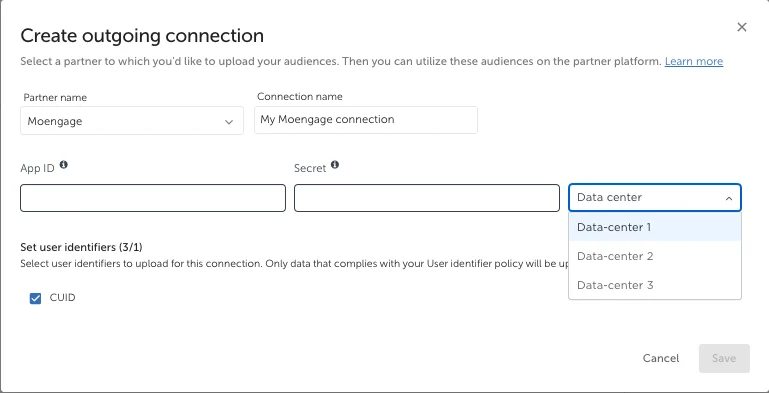
- Fill in the details on Workspace ID, Secret Key, and data center.
- Click Save.